

In today’s competitive job market, recruiters and hiring managers receive hundreds of applications daily. The truth is, your resume and cover letter only matter if your email is opened. Yes! The single most important factor determining that click is your email subject line. Now Read with me.
A vague or generic subject line like “Job Application” or “Resume” risks being instantly deleted, archived, or worse—filtered straight to the spam folder. Your subject line must be a clear, concise, and professional preview of your value. Think of it as the headline of your personal marketing campaign. This detailed, human-written guide will give you the precise SEO-optimized formula and examples to ensure your resume stands out and lands in the right hands. The Secret you need to know now!
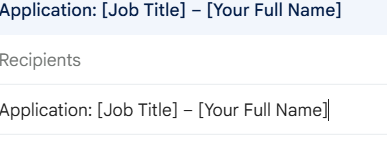
The Winning Subject Line (The 3-Part Formula)
The most effective subject lines are designed for quick scanning and easy filing by the recruiter. That is actually very simple if you go through with the formula. follow a simple, logical structure to view from the recruiter point of view while scanning your own email.
1. Purpose & Actionability (The Why)
Start by clearly stating the email’s intent. Recruiters often use email filters or AI tools to sort applications, so being direct is essential. Check these key terms you can mention in your email statement.
- Key Terms to Use: Application, Resume, CV, Applying for, Interest in.
- Avoid: Vague greetings like “Hi,” or phrases like “Urgent.”

2. Identification & Keywords (The What)
This is the most critical SEO step. You must include the exact job title and your full name for easy searchability and tracking.
- Job Title/Reference ID: Always use the exact job title listed in the advertisement, including any reference number or Job ID (recheck twice).
- Your Full Name: Including your full name makes the email personal and allows the recruiter to identify you immediately.
3. The Differentiator (The Edge)
If space allows, add a unique element that makes the recruiter prioritize your email. This can be a referral or a key qualification.
- Referral: If you were recommended, this should be the very first thing the recruiter sees.
- Key Credential: Mention a specific certification (e.g., CPA, PMP) or a hard-to-find skill that is a strict requirement for the role. Make a column to add all the details.
4. Essential Etiquette and Formatting Tips
Your professionalism is judged before the email is even opened. It may seems a lot, But still it get noticed so we may check and verify the silly mistakes to avoid at all cost. Few of the instruction are as follows:-
Use Proper Punctuation: Use hyphens (-), colons (:), or commas (,) to separate elements clearly.
Be Concise: Keep the subject line short—ideally under 60 characters (about 6–8 words). Long lines get cut off, especially on mobile devices.
Follow Instructions: Always read the job posting instructions first. If the employer asks for a specific format (e.g., “[Job ID] – [Name] – [Job Title]”), use that exact format.
AVOID: All CAPS, emojis, slang, or excessive punctuation (e.g., using “!!!” or “HIRE ME NOW!”). These look unprofessional and can trigger spam filters.
Proofread: Double-check the Job ID, company name, and job title for typos. An error-free subject line shows attention to detail.
Subject Line Examples
Use these templates to quickly customize your email subject line for sending resume based on your situation and don’t forget to attach resume.
| Scenario | Recommended Subject Line Template | Example |
| Standard Application | Application: [Job Title] – [Your Full Name] | Application: Senior Data Analyst – Maya Sharma |
| With Reference/Referral | Referred by [Referrer’s Name] for [Job Title] | Referred by Jordan Stein for Software Engineer Role |
| With Job ID/Reference No. | Resume: [Job Title] – Job ID #[Number] – [Your Full Name] | Resume: Marketing Manager – Job ID #568 – Tom Green |
| Experienced Professional | Resume: [Job Title] – [Years of Experience] in [Key Skill] | Resume: UX Designer – 8 Years in FinTech, Certified Scrum Master |
| Recent Graduate/Entry-Level | Application: [Job Title] – [Your Degree/Certification] – [Your Full Name] | Application: QA Internship – Recent CS Graduate – Anita Rao |
| Cold Email/Networking | Inquiry: [Job Title] Opening – Experienced [Key Skill] Professional | Inquiry: Sales Director Opening – Multimillion-Dollar Account Expert |
Pro-Tip: If you are responding to an expired job posting or simply reaching out to connect, use softer language like “Inquiry” or “Interest in.”
The Email Body (Brief and Professional)
What to Write After the Subject Line
Keep the email body itself extremely concise. Recruiters are busy and mainly want to find your attached documents.
- Salutation: Use a professional greeting. If you know the recruiter’s name, use it (e.g., Dear Ms. Smitha). Otherwise, use Dear Hiring Manager.
- Introduction: State the job you are applying for and where you saw the advertisement. If referred, mention the referrer in the first sentence.
- Value Highlight (Optional but Recommended): Briefly (1-2 sentences) mention your most relevant skill or quantifiable achievement that matches the job requirements.
- Closing: End with a simple, professional thank you and an offer to provide additional information. Always confirm the attachments are included.
By treating your email subject line for sending resume as a highly optimized, searchable headline, you drastically increase your chances of being noticed, screened, and called for an interview.
Must Read Article
Viksit Bharat Buildathon Hackathon 2025 upto ₹1 crore prize money pool
Easy Work From Home Jobs for Housewives – Flexible Opportunities Across India
Resume Tips AI Prompts: Smart Prompts to Build a Winning Resume in 2025
HR Interview Questions and Answers for freshers 2025
SBI Platinum Jubilee Asha Scholarship 2025 – Full Guide: Eligibility, Amount & How to Apply
Tips to Strengthen Your SBI Platinum Jubilee Asha Scholarship Application 2025
Common Mistakes to Avoid While Filling the Form of SBI Asha Foundation Scholarship
How to Calculate CTC and Salary Hike Calculator
Difference between CTC vs In hand/Take home Salary, Why this is Important in Jobs
Know Everything about CTC (Cost to Company) you need to know as a employee
Easy Work From Home Jobs for Housewives – Flexible Opportunities Across India
No Stress Online Work from home for Students Check out the list now